← All work
Case study Product design Hebrew · iOS & Android

Careback

Born from a genuine need to gently ease the weight of Alzheimer’s care, surrounding a loved one with a circle of family support, while allowing them to live safely, comfortably, and with dignity at home for as long as possible.

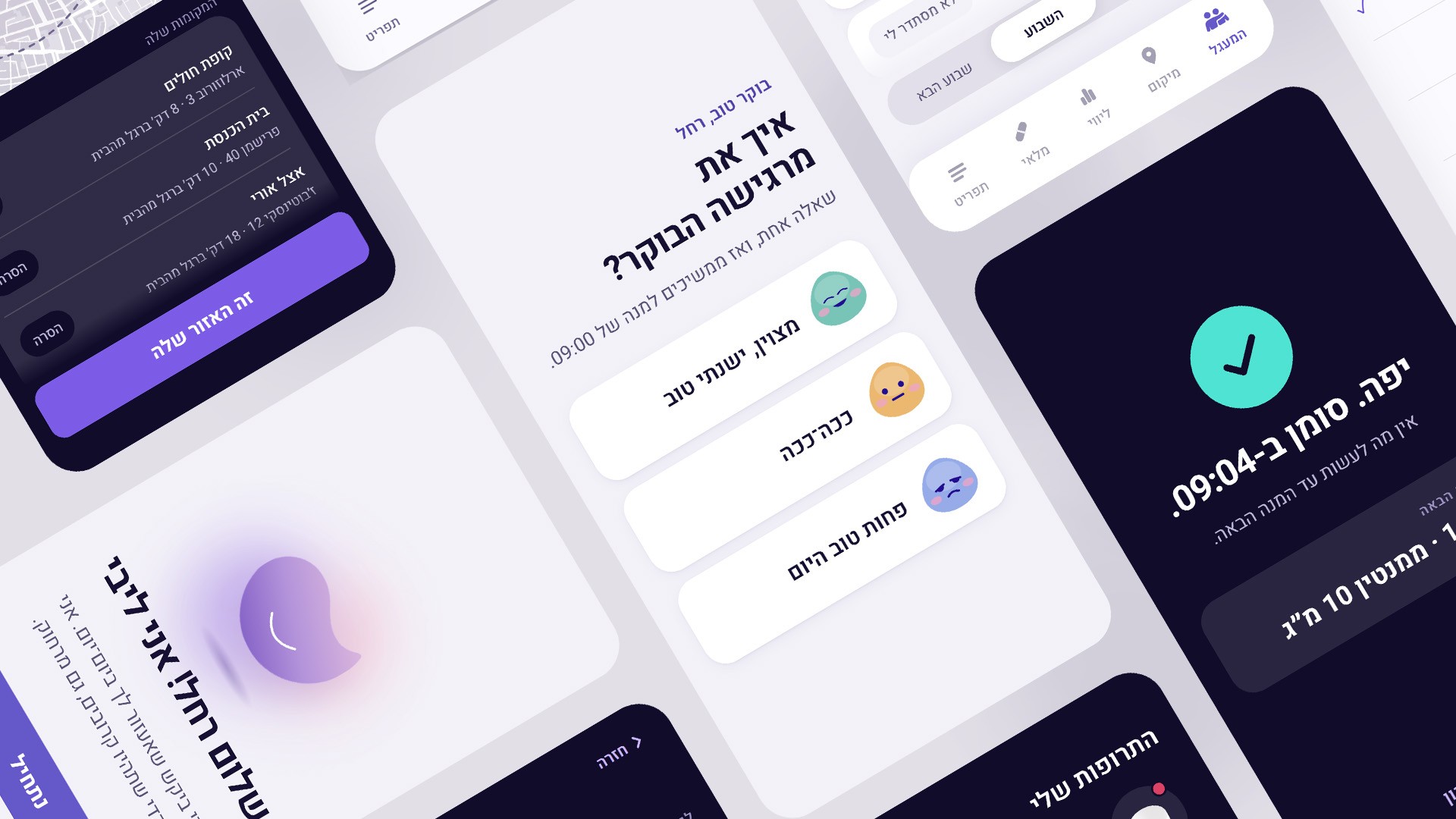
Careback screens, light and dark, arranged on an angle
62screens rebuilt, with working state
13sign-in, error and edge states
18icons in the entire product
2perspectives, one product
One event, end to end.
The family side
Rachel's side
The problem

Staying independent and staying safe stopped being the same thing

Careback was built by two founders who were each caring for a parent with Alzheimer’s. They found what families always discover on their own, late and alone: caring for one person is round-the-clock work for everybody around them. Not a job someone has. A rota nobody agreed to.

So the product had four things to carry, and they are ordinary things – staying in touch, keeping up with a condition that changes faster than anyone visits, splitting the work between family members, and the care itself. None of that is a feature. All of it is a day.

And it had to be two products at once. One audience is the family doing the caring. The other is the person being cared for, who gets an interface that matches where they are, preserving as much control as they can still hold. That is the hard requirement in the whole brief: an interface that has to stay usable while the person using it changes. Careback is built for the earlier stages – while the person it serves can still hold a phone and use it.

The gap is right there. Someone should stay at home, inside their family, independent, for as long as that is possible, and that need does not move at the same speed as the illness. Careback exists to hold those two apart for longer.

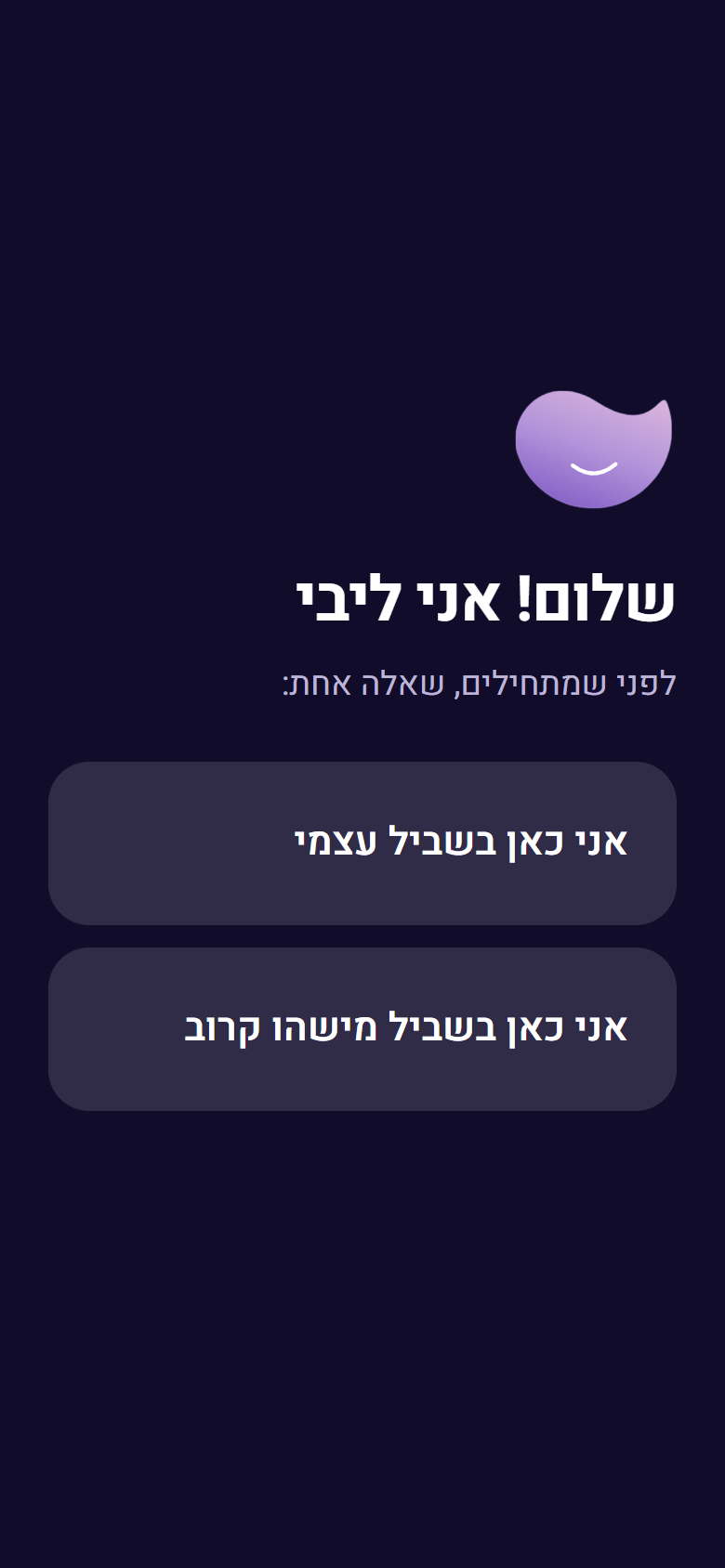
Libi says hello and asks one question, dark mode
dark
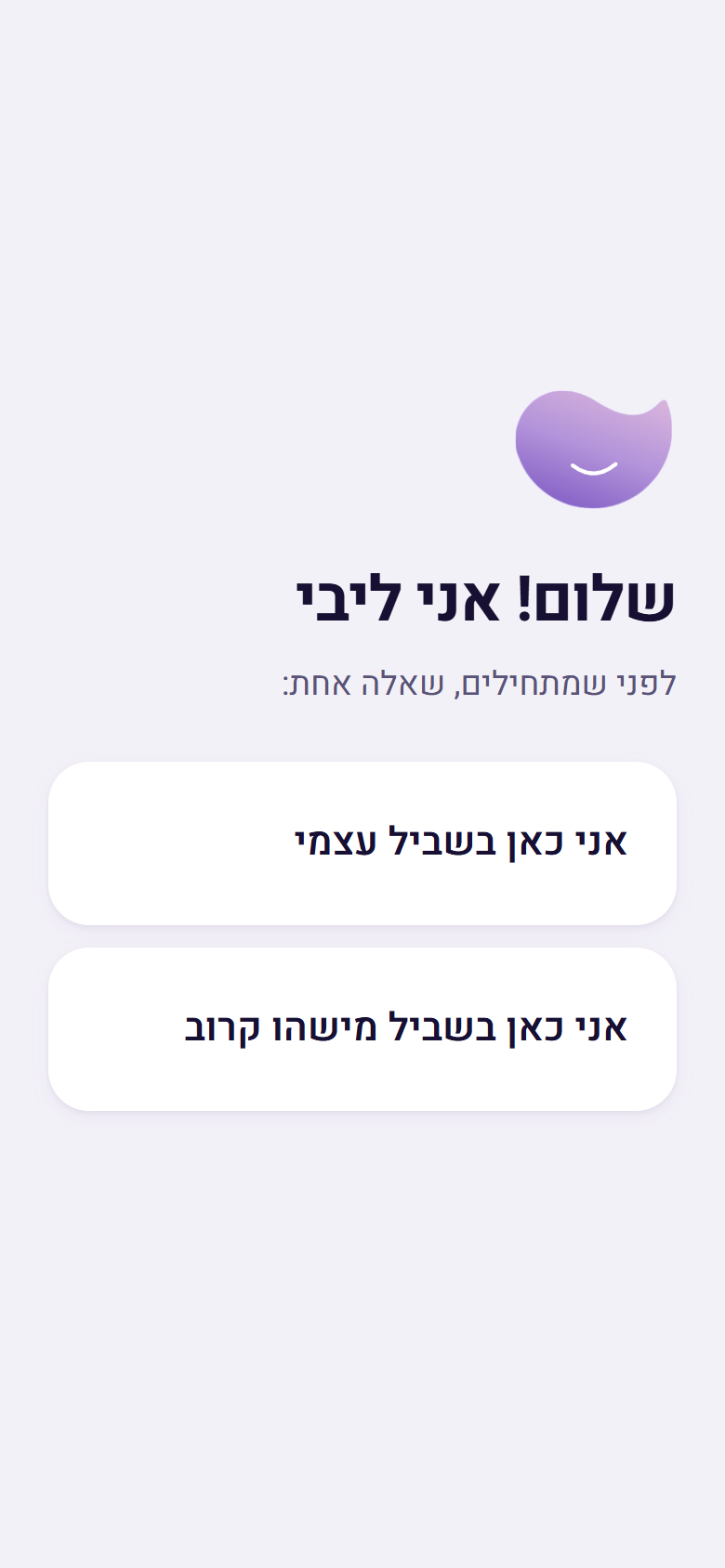
Libi says hello and asks one question, light mode
light

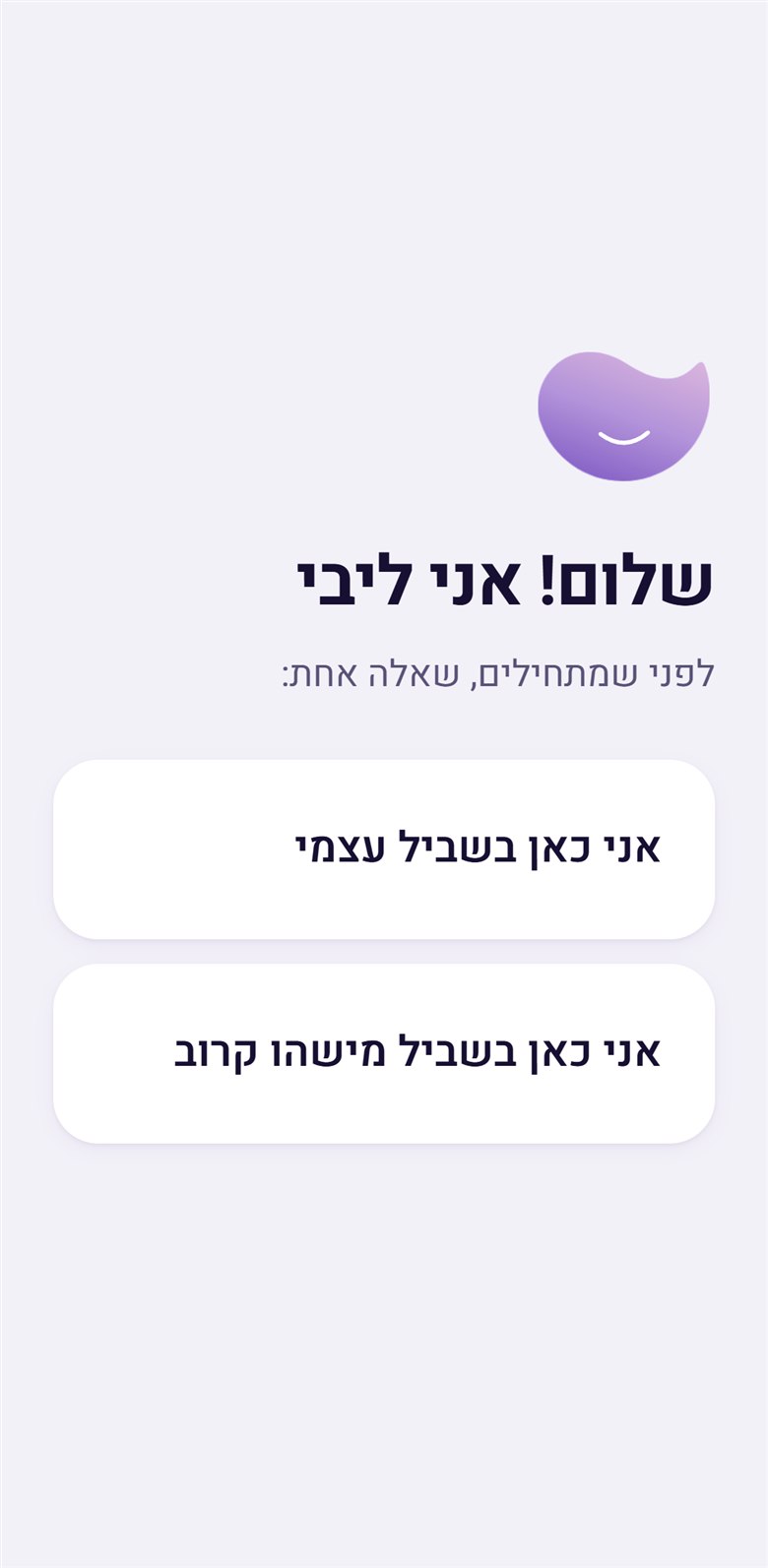
One screen decides which product you hold, and it never asks you to name yourself. Not “select your role”. Libi says hello and asks one question: «אני כאן בשביל עצמי» or «אני כאן בשביל מישהו קרוב» – here for myself, or here for someone close. The idea was there in 2021; here it became sharper. The question no longer sorts people into carer and patient. It describes a relationship – a person who needs support, and the circle that gives it.

The product’s entire thesis fits in four words – אותן תרופות, שתי נקודות מבט: the same medications, two points of view. Not a lite version and a full version. One truth, seen from where you stand. The patient’s side is a “Now” screen: big reminders, one tap to mark. The carer’s side is the care circle, the stock count, and alerts for what has not been marked – the anxious work, kept on the phone of the person whose job it is to be anxious.

Both screens above are the same screen. The app ships a light mode and a dark mode, and in this product that is not a preference – it is an operating condition. A medication app is a night-time product by definition: a dose at 22:00, a daughter checking before she sleeps, someone awake at 3am who needs to read one line and go back to bed. Half of this product’s hardest moments happen in a dark room.

Which is why the two themes were built rather than switched on. Every token in the system has a second value – the accent goes lighter in the dark, the alert stops being red – and there are exactly three that do not: the mood colours are identical in both. That is the tell. A theme that was toggled would have inverted those too.

Patient’s side · first person singular

אני לוקח את התרופות

התרופות שלי

המשך למסך «עכשיו»

Carer’s side · second person plural

במי אתם מטפלים?

איך קוראים לכם?

בקשו ממי שאתם מטפלים בו את הקוד

The split is not only in the screens. It is in the grammar. On the patient’s side, the app speaks as I and mine – my medications, I take them. On the carer’s side, it addresses you in the plural: who are you caring for, what are you called, ask the person you care for for their code. Hebrew makes you choose a person for every sentence, so there was no neutral option available – and the choice made here gives the patient ownership of their own treatment, while giving the family a job.

And Hebrew will not let an interface stay neutral about who it is talking to. Every verb addressed to a person carries their gender, so «איך אתה מרגיש הבוקר?» and «איך את מרגישה הבוקר?» are the same screen for two different people. There is no wording that serves both. An English product ships one string here. A Hebrew one cannot.

So the app has to know, yet it never explicitly asks. Onboarding does not put a gender field in front of anybody. It asks «במי אתם מטפלים?» – who are you caring for? – and offers six answers: אמא · אבא · סבתא · סבא · בן/בת זוג · אחר. Four of those carry a gender inside them. The interface gets what it needs out of a question a person would actually ask, and the person is never made to fill in a form field about themselves.

Which is the same move as «אני כאן בשביל עצמי» instead of select your role, and it happens throughout: the product asks human questions and derives its data from the answers, rather than asking for the data.

The app itself speaks as a woman. When someone answers that they are having a hard morning, it replies «אני שומעת אותך» – I hear you, in the feminine. Not a neutral system voice, and not a masculine default. In a product about looking after a parent, that is not an accident of grammar. It is a decision about who is in the room.

The two sides are not named after job titles. They are מצב חולה and מצב משפחה – patient mode and family mode. Not carer, not admin, not supervisor: family. And there is one line in the rebuild notes that says the whole thing better than any of this does:

מצב משפחה הוא נקודת מבט, לא אפליקציה שנייה

“Family mode is a point of view, not a second app.”

קרובים אליהם, גם מרחוק

“Close to them, even from far away.”

יש מי שמלווה אתכם ואת האהובים שלכם לאורך כל היום, ברגישות ובהבנה, כדי שאתם לא תצטרכו לדאוג.

“Someone is with you and the people you love, all day, gently and with understanding, so that you don’t have to worry.”

This is the first thing anyone reads, and it is not a description of the product. It does not say what the app does. It is addressed to one person – the family carer – and its job is to comfort them.

They are in a situation with no good moves. They are losing a parent slowly, and cruelly, a little at a time, and most of what they feel is that there is nothing they can do. A launch screen cannot fix any of that, and it should not pretend to. So this one does the only honest thing available to it: it says they are not doing this alone.

Notice what it does not promise. Not control, not tracking, not peace of mind – the word is מלווה, accompanies. Something that walks beside you. The product is positioned as company, not as a solution, because the thing they are going through does not have one.

What the product is actually for is buying time. It does not treat anything and it does not pretend to. Everyone involved knows where this road goes: at some point home stops being possible, and there is a nursing institution at the end of it. Careback exists to make that point arrive later – to keep a person in their own home, inside their family, holding on to as much of their own life as they can, for as long as that can be done well.

Which is also why the whole interface is written the way it is. Every instruction in the app is in human, warm, non-clinical language, because the product is not a medical device that happens to live on a phone. It is something a family uses through some of the hardest years of their lives.

And underneath all of it there is something much plainer than a product strategy:

At its foundation, the idea is a child’s love for their parent.

בכבוד, תמיכה והמון אהבה

“With dignity, support, and a great deal of love” – the founders’ brief, in their own words.

What the 2026 rebuild went after

A screen that asks “did you take your pill?” is the easy part. A product used by people with cognitive decline, and by the families caring for them, breaks somewhere else entirely – when a password is forgotten, when a service is down, when there is no signal, when a single dose simply was not marked.

Those are the moments the product speaks most sharply. Usually it speaks badly.

So the rebuild went there first – a rewrite of what happens when things do not go to plan, and a decision about who gets to see what, with whose permission. And then further: support for the circle and for the person being cared for, keeping everyone in sync, and taking some of the weight off.

The research behind the product is the founders’ own. Each of them had a parent with Alzheimer’s, and they ran studies with people living with it. I worked from that material and from the recorded testimonies rather than running my own – the findings below came from reading it against the existing interface and deciding what it was getting wrong.
The turning point

The app does not know whether the medication was taken

It only knows whether somebody marked it. That distinction is the whole project.

Doses that had not been logged were labelled Missed – a word that assigns failure to a person who usually just left the phone in another room.

Before
Missed dose · 21:00
After
מנת 21:00 עוד לא סומנה
Reading

“The 21:00 dose has not been marked yet.” Hebrew carries this as a passive with no subject, so nobody is blamed. The word עוד – “yet” – leaves the door open.

The argument is factual before it is kind, and the new wording happens to be both.

The same principle runs through the password screen, titled קורה לכולם – “happens to everyone.”

Ethics

A tracking feature designed to track less

Leaving a familiar area is one of the defining fears in Alzheimer’s care. The obvious answer – a map with live location – turns a care product into a surveillance product. The founders had already avoided it: their model marks one familiar area and says nothing until someone leaves it. That is one of the strongest ideas in the product.

What it lacked was permission. A carer could switch it on without the person being told. The rebuild added an explicit consent flow to her own device. People with cognitive decline are precisely the population most likely to have their autonomy removed for their own good – so the restraint has to be visible, not merely true.

But the reason to restrain it is not really privacy. It is how it feels to be the person on the map. The feature exists to hold two things at once: she stays safe, and she stays independent – and the second collapses the moment the first is done clumsily. A product that watches continuously tells its user something about herself every time she opens it: that she is a risk being managed. One boundary and silence tells her the opposite – that she is trusted right up to the edge of the thing everyone is actually afraid of.

The design goal was never “track her safely”. It was that she should not feel written off.

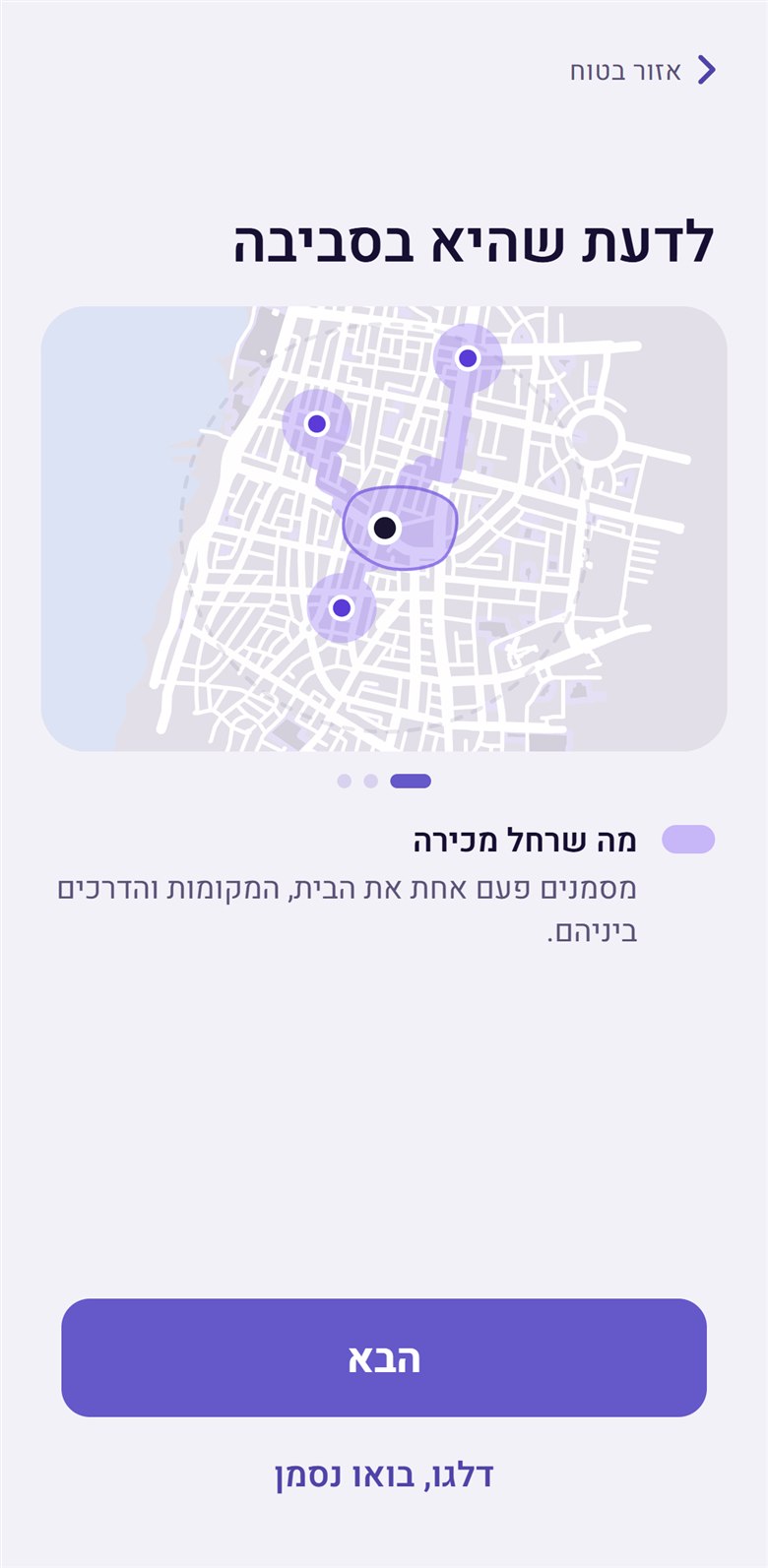
Location intro screen: knowing she is nearby
The boundary – marked once: the home, the places, and the routes between them.
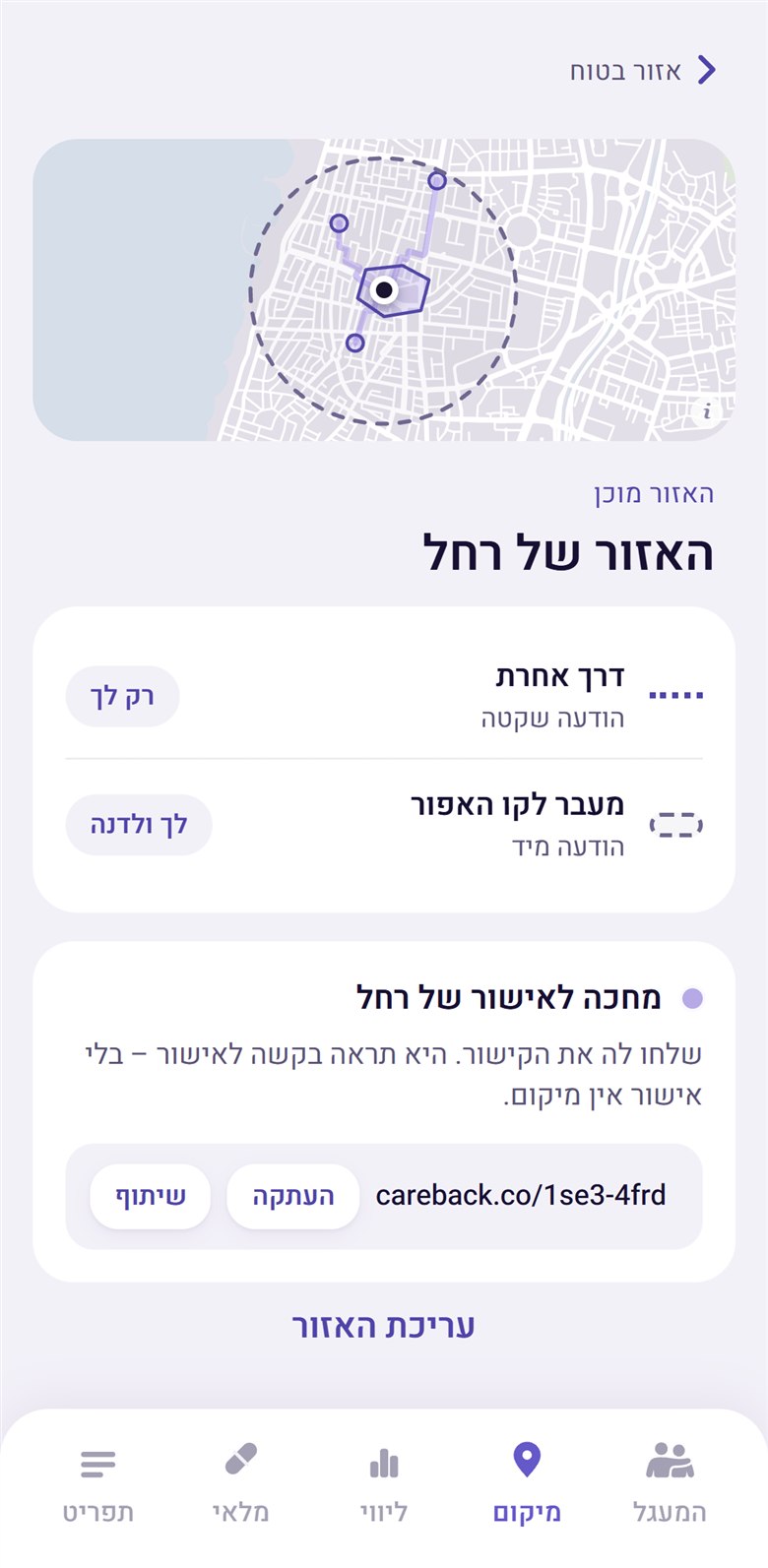
Waiting for Rachel’s approval on her own device
It cannot start without her device – «without approval there is no location».
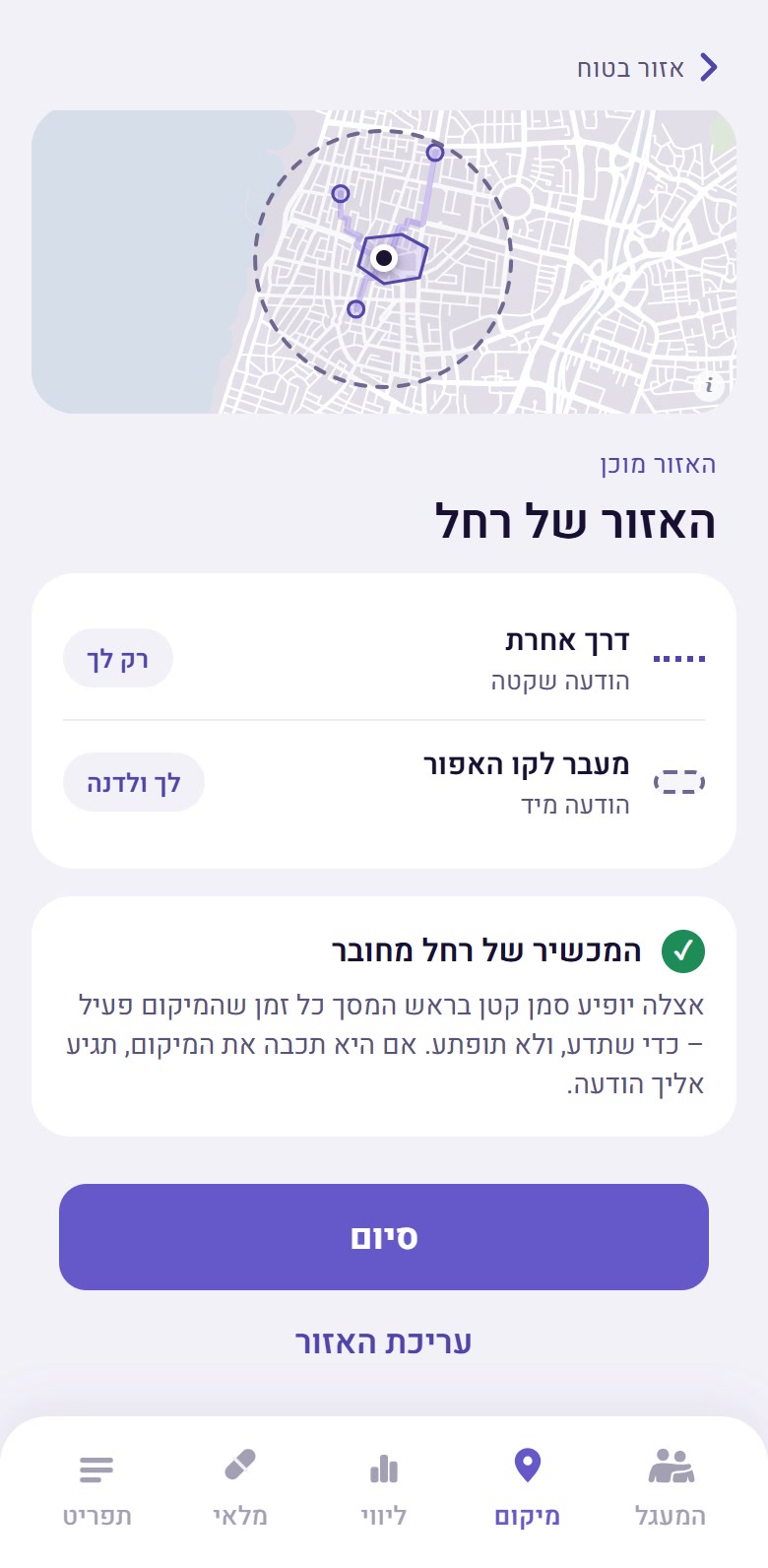
Rachel’s device connected, with a visible marker
She sees a marker whenever location is on – «so she knows, and is not surprised».
The boundary
לדעת שהיא בסביבה
“Knowing she’s nearby”
Mark one familiar area and hear about it only if she leaves. No routes, no movement history. One boundary that you define.
Consent as a condition
מחכה לאישור של רחל
“Waiting for Rachel’s approval”
She sees a request to approve – without approval there is no location.
Scope of collection
אין היסטוריית תנועה.
אפשר לצמצם את האזור בכל שלב.
“No movement history. The area can be narrowed at any time.”

Closing the gap that is out of our hands

The location feature was finished when I read a news story about a woman with Alzheimer's who left home without her phone, money, or water, and walked somewhere she did not know. She was found too late.

It exposed a flaw in our own design. The safe zone knows where the phone is. It does not know where the person is.

The app prepares for the moment the phone stops being enough. When Rachel leaves her area, Uri is told. He calls; she does not answer. Dana tries too. Only then does a button appear to ask for help with the search – and it sends Rachel's page.

The page is written for a stranger: a neighbour, a taxi driver, someone at a bus stop. In one study, nearly half of people with dementia who went missing were found by passers-by, not by police. The page is ordered by what that stranger needs, second by second: her face, large; her name; that she lives with Alzheimer's; how to approach her – slowly, gently, without alarming her. Contact details come last. The only detail not prepared in advance is what she is wearing today.

Speed matters, which is why the page is ready before it is ever needed.

Every step is taken by a person. The app does not call the police and does not send anything on its own. It makes the next step easy and leaves the decision with the family.

The only location feature worth building is one you can explain to the person on the other end of it.

Design decisions

Every visual choice answers to one of two people

One is holding the phone with an unsteady hand and a diagnosis. The other is checking it at eleven at night from another city, worried. Nothing here was chosen because it looked current – each decision below is followed by the person it was made for.

The biggest risk in this product is not a missed dose. It is making a grown adult feel like a child.

Everything below is governed by one rule. A person with Alzheimer’s is losing control of their own life in increments, and they know it. An interface that is bright, rounded, rewarding, and simplified for their benefit confirms that loss on every single screen – it tells them, politely, that they are now being managed. So the palette had to be warm without being sweet, and the whole thing had to be drawn for an adult going through a difficult chapter, not for a patient.

That rule is why the specific decisions look the way they do, and it is worth reading them against it: a typeface chosen for being neither institutional nor toy-like; a violet made by warming the clinical blue rather than replacing it with a friendly colour; a patient’s side that speaks in the first person – התרופות שלי, my medications, not your medications; and a location feature that shows her a marker rather than watching her quietly. None of those are separate ideas. They are the same idea, four times.

A smile to say hello, a hand that does not judge, and action when it counts

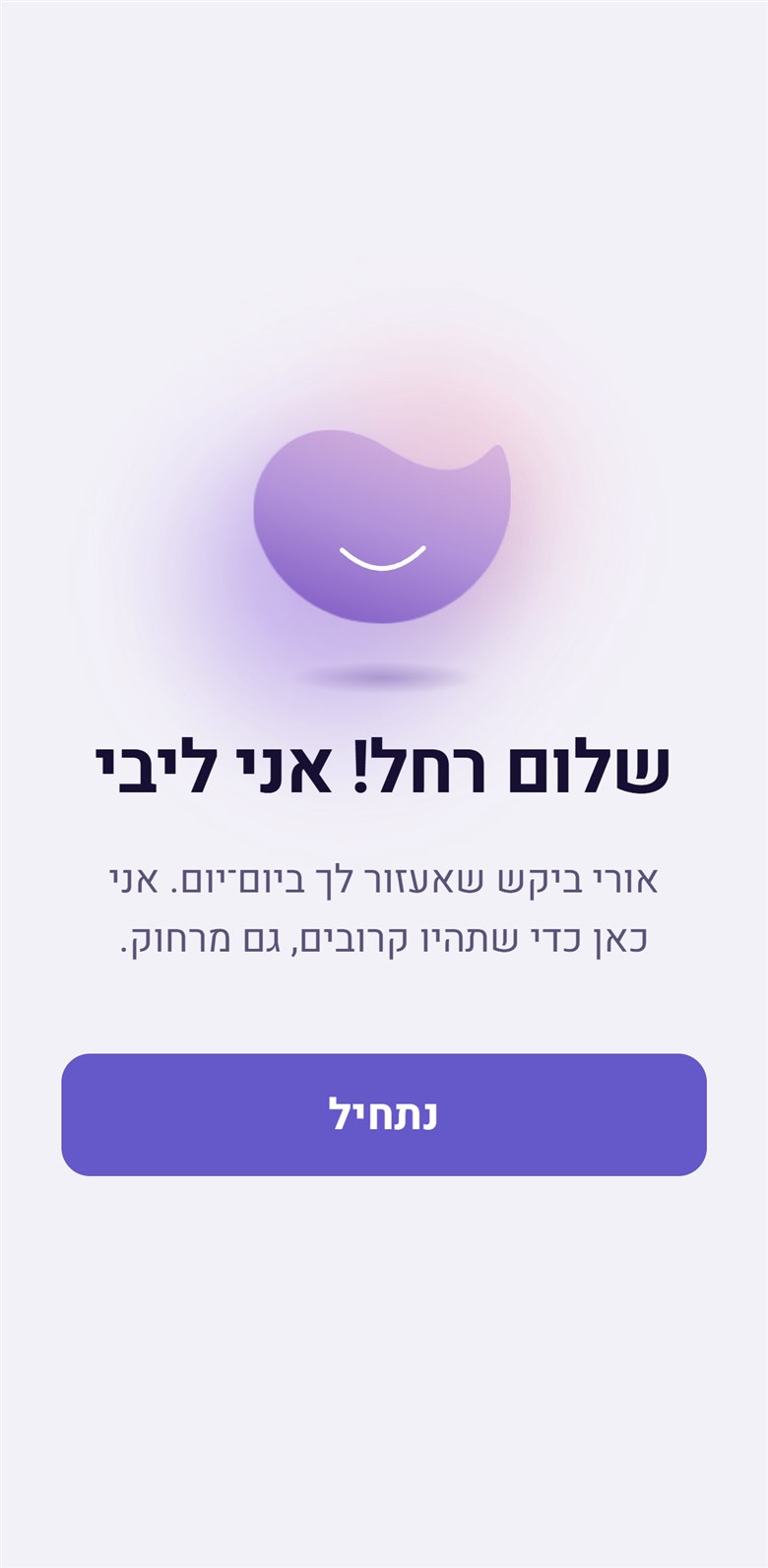
Rachel does not sign up for Careback. Her son, Uri, invites her. The first thing she meets is not a form, but a voice: «שלום רחל! אני ליבי» – Hi Rachel, I'm Libi.

The intent behind this moment is simple: to show that someone is thinking of her, and cares. The difficulty is that care slides easily into supervision – into the exact trap this case study warns against: treating an adult like a child.

Libi does not decide what Rachel needs. She asks. Through the opening questions, Rachel marks what feels comfortable. By answering, she is the one asking Libi for help. The care is requested, never imposed.

A "no" is respected. If Rachel declines the morning question, Libi stops asking, and Uri is not notified. That is her right. Because needs shift as the illness progresses, Libi checks in periodically with a single question: «רוצה שאמשיך לשאול?» – do you want me to keep asking? A pulse, not a reset.

Only one "no" reaches the family. If Rachel turns off her medication reminders, Uri receives an alert – and Rachel is told this when she makes the switch. The boundary is deliberate: the medication log is the core of the product. It is an indicator of change, and of decline, in her health. Without it, the app has no purpose.

The same logic applies to the hardest scenario. While Rachel is still independent, she approves her own page – the page the family would share if one day she cannot be found. The decision of how she is described to strangers remains hers, made ahead of time, on a good day.

Typography

Hebrew has no italics and no uppercase, so two of the usual emphasis tools are gone. Weight does the work – one face, four weights, and guillemets carry naming.

Aa אא TypographyHeebowas Roboto, 2021

Scale/every value below is the product's own

Screen title Weight:
Size:
Line height:
Bold (700)
34 px
38 px
בוקר טוב
Screen name Weight:
Size:
Line height:
Semibold (600)
24 px
30 px
התרופות שלי
Sentence title Weight:
Size:
Line height:
Semibold (600)
28 px
34 px
זה מה שבחרת
Option title Weight:
Size:
Line height:
Semibold (600)
21 px
31 px
אני כאן בשביל עצמי
Button Weight:
Size:
Line height:
Bold (700)
20 px
29 px
בואי נתחיל
Body Weight:
Size:
Line height:
Regular (400)
16 px
24 px
אפשר לשנות בכל רגע
Caption Weight:
Size:
Line height:
Regular (400)
15 px
22 px
טבליה · עם האוכל
Label Weight:
Size:
Line height:
Semibold (600)
13 px
19 px
לפני שמתחילים
Micro Weight:
Size:
Line height:
Regular (400)
11 px
17 px
היום
LogoAlan Sansnever in the interface
Wordmark Weight:
Form:
Semibold (600)
outlined
careback
Body runs at 16–17 px. The smallest type anywhere in the product is 11 px, and it appears nine times – only ever beside something much larger.

Colour

Every colour has two values, and the pair is the decision. In dark the accent gets lighter, not darker, and the alert stops being red – a crimson at 3am reads as emergency, and most of what this app says at 3am is not one.

Main · in light

Accent#6558C9 Accent ink#4F44A8 Alert#C2265E Ground#F3F1F8 Surface#FFFFFF Ink#171033

Main · in dark

Accent lighter#7C5CE6 Accent ink#C9B4F5 Alert no longer red#FF8FA3 Ground#110C2A Surface · white 10%#29243F Ink#FFFFFF

Mood · identical in both themes

Gold#EBB870 Teal#78C4B7 Periwinkle#96ABE8

Ink ramp

Ink 0#171033 Ink 1#453D6B Ink 2#5A5378 Ink 3#655B8C Ink 4#9089AE Ink 5#C8BCE8 Ink 6#E4DDF3 Ink 7#F2EFFA Ink 8#FBFAFE
The three mood colours are the only ones with no dark variant. A colour that means this is how I feel cannot mean something else after dark.

Controls

Every form asks a person to produce from memory the exact thing they are losing. So the answer to a text field is a camera.

Scan/no keyboard

כוונו את המצלמה לאריזה
אנחנו קוראים את השם והמינון מהאריזה

The name and the dose – the two hardest things to recall – are read off the packet.

Choice card/22px · white, lifted

אני כאן בשביל עצמי
אני כאן בשביל מישהו קרוב

A choice is a white card on the lavender ground, lifted by a soft violet shadow. No tick, no outline – nothing here was a question with a right answer.

Time row/44px · stepper, not entry

−09:00+הסרה
−21:00+הסרה
+ הוספת שעה

Times already set are objects you can see. A time is moved with − and +, never typed into a box that can be got wrong.

The 2021 style guide documented toggles, radios, checkboxes, search, text fields, password fields, strength meters and two calendars. This is what is left.
A control you press to do something is a rounded rectangle, 14px. A surface that holds a choice is a card, 22px. Only steppers, chips and navigation stay round.

Button

Platform minimums are written for a steady hand. Every filled button sits about a quarter above the stricter of the two, and the one that marks a dose is bigger than all of them.

Primary/56–58px · 36 of 46

Secondary/48–52px · white, lifted

Ghost/a text link, never filled

Dose/72px · the one action

Apple asks for 44. Google asks for 48. Every filled button on Rachel’s side clears both.
No hover state is defined anywhere in the build, and that is correct – this is a phone, and a finger does not hover.

Icons

Eighteen icons in the entire product. Three of them are faces, and they move – motion carries the meaning for someone whose recall is going.

Mood faces/72px · animated

מצוין, ישנתי טובit hops ככה־ככהit sways פחות טוב היוםit shivers

Why the hands came out

For a promise that has to survive at 24 px

The first round said it out loud: hands, holding. The second round is where the smile arrives – and it is the same curve that shipped, unchanged, drawn once and never redrawn. Then the hands came out.

What survived is the gesture, not the illustration of the gesture. The feeling moved into the three things that survive at any size – the shape, the smile, and the violet – carried by form and colour rather than acted out by a picture of care. And the notch cut into the top reads, quietly, as a tick: the action this app asks for every single day is ticking something off.

Warming the clinical blue

For the carer reading at 11pm

Every health app reaches for blue. Blue is the colour of the clinic – and clinical is the one register this product could not afford, because the people opening it are not staff. They are a daughter at 11pm and a woman who would like to still be trusted with her own morning.

So the blue was not rejected. It was warmed. Red was added to the medical blue until it turned violet – the reasoning is literal, not poetic: violet is blue plus red, the clinic plus the person. And the palette keeps both ingredients visible on the same page: the accent is the mix, and the alert is the red on its own.

Eighteen icons in the entire product

For someone whose recall is going

The mood is stated three times over, and that is the decision. The mouth changes, the eyes change – on the low face the lids fall heavy, tilted down – and then the whole icon moves differently: the good one hops, the middling one sways, the low one shivers. Three channels carrying one answer, so it survives a small screen, a fast glance, and eyes older than the app.

The cheeks sink with the mood – the same pink on all three faces, sitting a little lower as the answer gets harder, and only the good face flushes. Nobody is meant to notice it. It is the difference between a scale that has been drawn and a scale that has been felt.

The labels are sentences, not grades – «מצוין, ישנתי טוב», in her own voice, about her night. And the app answers in kind. Choose the low face and it does not log a data point; it says «אני שומעת אותך» – I hear you.

These screens were not in the original product. I added them – because nobody knew how the morning had actually gone. The family got medication data and no idea whether she was all right. And the interface leans differently depending on the answer: answer good and the primary button is «ממשיכים ליום»; answer low and telling the family becomes the primary action, with a third button that exists on no other screen – «תיאום שיחה עם אחות». The product offers more help when more help is needed, and never once forces it.

That restraint runs across the entire build. For this user, an abstract icon is a memory test – a pictogram only works if you recall what it stands for, which is the very faculty this illness takes away. A word does not need to be recalled, only read. So across sixty-two screens, there are only eighteen icons; everything else is written in plain Hebrew.

The medication is unavoidable. Taking it should not be a burden.

It is an unpleasant task, made harder when there are multiple pills, several times a day. I wanted to ease that for people already dealing with more than enough – such as the progression of Alzheimer's. In Careback, a medication looks like itself.

Scanning the pack is meant to bring up the exact product – the pill Rachel actually holds, not a coloured dot she has to learn stands for aspirin. As argued earlier, a word does not need to be recalled, only read. The same goes for a photograph of the real pill: it does not need to be remembered, only recognised.

The photograph is not enough on its own. Most real pills are white, and two can look almost identical. Recognition is therefore layered: the image, the name, the dose, the time, and how it is taken. If one fails, the others hold – the same principle as the mood faces, where the answer is stated three times over.

The idea runs into a real problem: product images, and the data behind them, are uneven in quality. The prototype shows the standard they should meet. The pills in it are AI renders, made as realistic as possible – what the scan should return.

The craft

The thirteen screens most portfolios leave out

A portfolio usually shows the path that works. But trust in a health product is decided the moment something breaks – and that is where you have to explain what happened and offer a way forward.

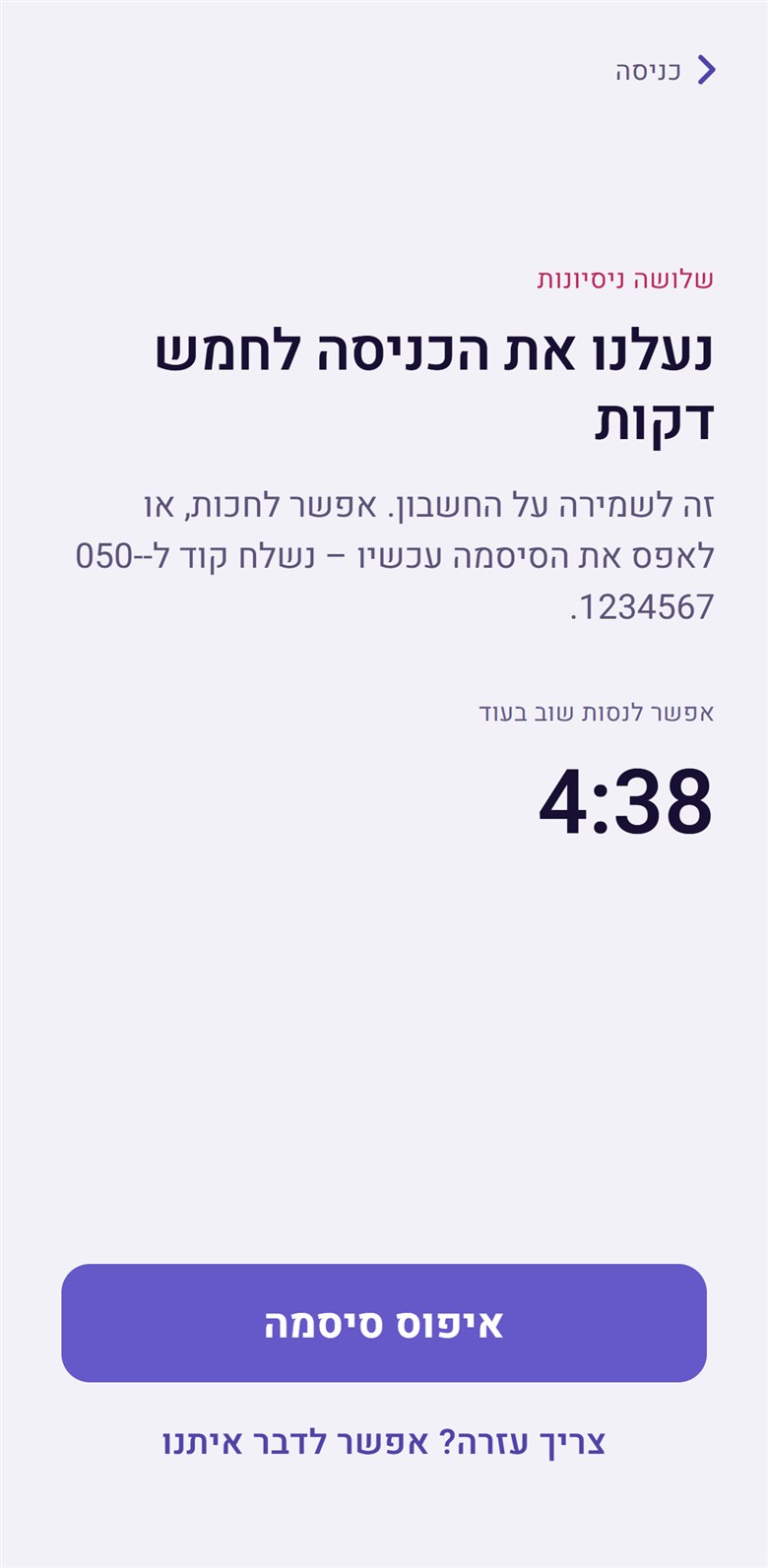
Sign-in locked for five minutes, with a timer
After three attempts – the wait is a number, and there is a way out beside it
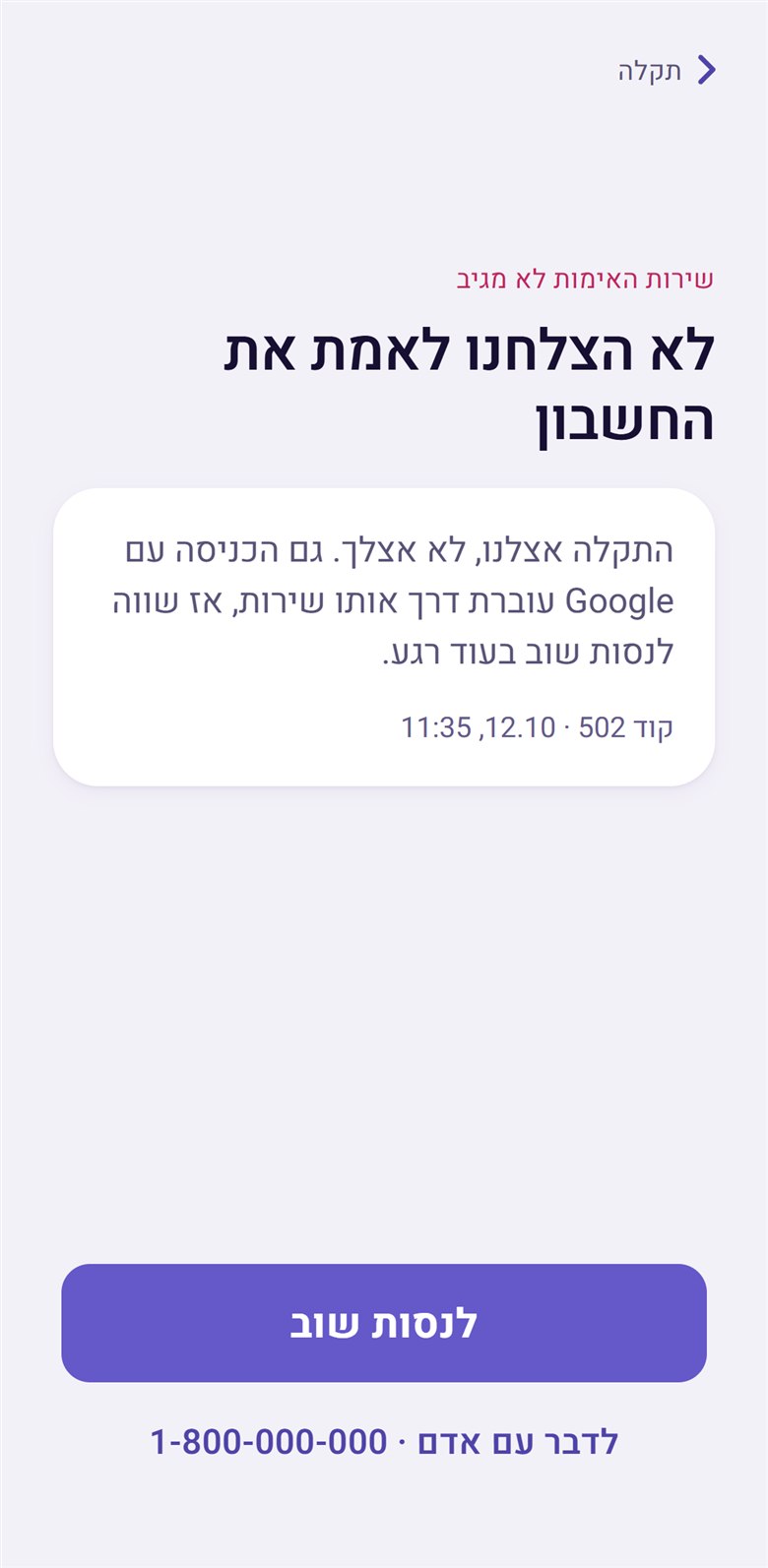
Verification service down: our fault, not yours
The verification service is down, whose fault it is, said first
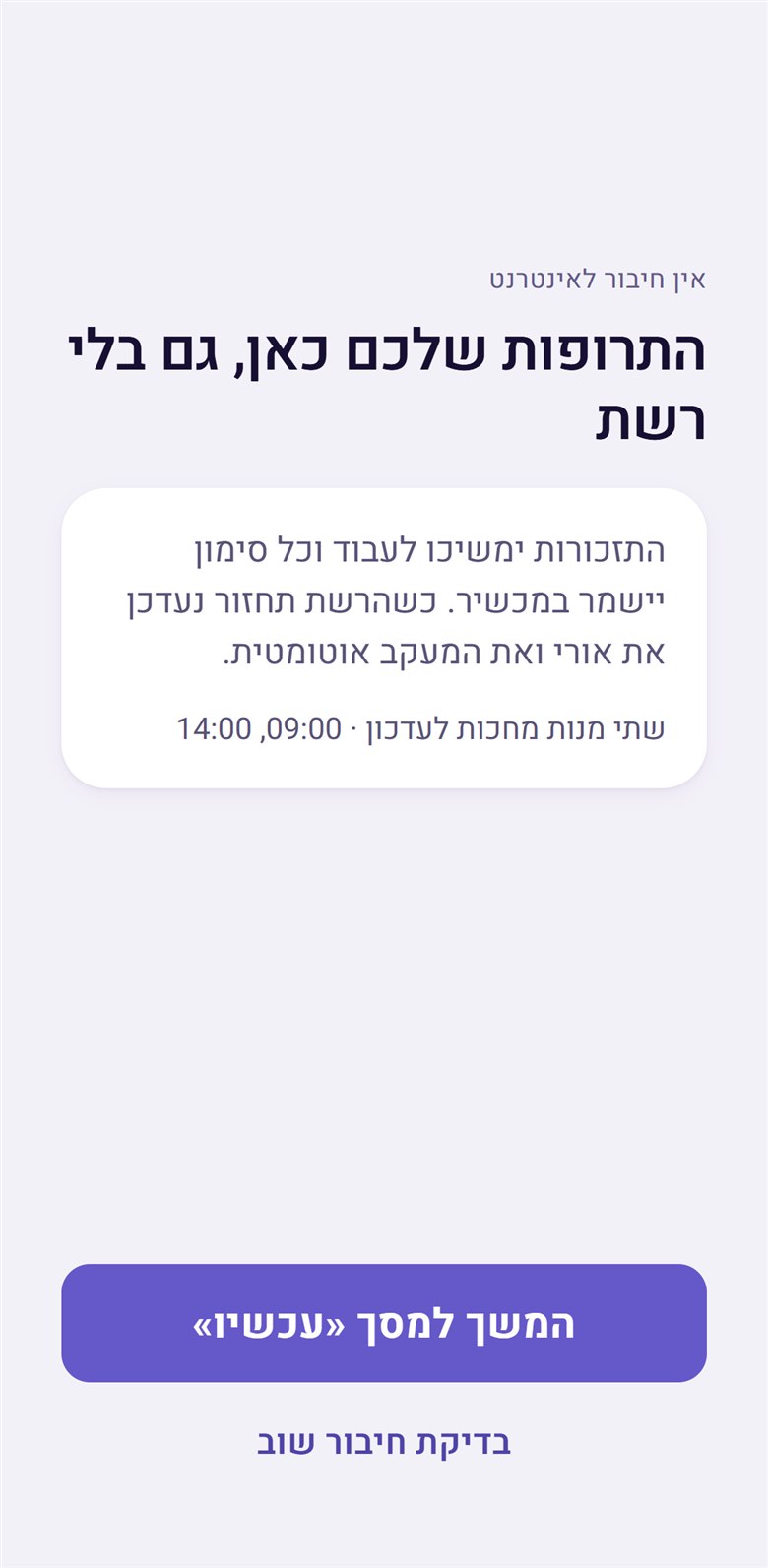
No connection: your medications are here
No connection – the only failure that promises the product still works
Lockout
נעלנו את הכניסה לחמש דקות
“We’ve locked sign-in for five minutes”
“We locked” – the system owns the action, and states the duration outright.
Verification down
לא הצלחנו לאמת את החשבון
“We couldn’t verify the account”
Our fault, not yours.
Deleted account
החשבון הזה נמחק
“This account has been deleted”
A terminal state gets its own screen instead of an opaque sign-in error.
Forgotten password
קורה לכולם
“Happens to everyone”
The heading removes embarrassment before it asks for anything.
Wrong family code
אולי הקוד התחלף?
“Maybe the code changed?”
A question, not an accusation, and it shows the entered code so it can be compared.
Offline
התרופות שלכם כאן, גם בלי רשת
“Your medications are here, even without a connection”
Says what still works, instead of what was lost.
Empty state
כשתיקחי משימה, היא תופיע כאן.
“When you take on a task, it will appear here.”
Says what will fill the space, not what is missing.
Connection complete
המכשיר של רחל מחובר
“Rachel’s device is connected”
An explicit close – the user knows they are done.
Build

A state is not a screen

The location module arrived from the old version as a sprawl of separate artboards. Some were the same screen in different states; some were routes that opened and never closed. It carries eleven screens now – and getting there was not tidying. It required deciding what is genuinely an independent state and what is a variation of one.

  • A state is not a screen: Loading, empty, and error are layers on one screen, not three entries in a menu.
  • Every route closes: If a user can enter a state, there is a defined way out – which is why a “Rachel’s device is connected” screen exists at all.
  • Dead ends are removed: An artboard with no state leading to it was deleted. Including the good-looking ones.
Why this is the hardest thing to show in a portfolio: the output of this work is fewer screens. There is no impressive screenshot of it – only a product somebody can actually maintain.

Why it was rebuilt now, and by one person

The original work happened long before any of this was possible. Careback was specified and designed in 2021, in Adobe XD, the way design worked then: I drew the product, and turning it into something you could actually open required a team. That was simply the shape of the job. The drawings were the end of what a designer could produce alone.

This year I started working with AI tools, and at some point I realised I was ready to just do it. To take the product I had designed and rebuild it myself – at minimum as a working prototype – without waiting for a team to become available.

What exists now is not a set of screens. It is 62 screens with real state: you can move through onboarding, choose which side of the app you are on, answer the mood check-in and get its reply, mark a dose, walk the whole location consent flow, and hit the failure states on purpose. It runs in light and dark. The icons animate. It is the product, behaving.

To be exact about the division of labour, because it matters: the tools did not decide anything on this page. Every judgment in this case study – dropping the hands, warming the blue, the grammar of each side – is the same judgment I would have brought in 2021. What changed is that the work no longer needs someone else’s availability to exist. A designer who can produce a working thing is a different professional from a designer who produces a specification for one.

And the project may yet wake up. That is part of why this was worth doing.

It took about five weeks. Not dedicated weeks – it happened in the gaps between other work: a fix here, something added there, session after session, until it was a product rather than a plan. The 2021 specification had a team behind it. This had five weeks of in-between time.

Which is worth being exact about, because the interesting part is not the speed. The judgment did not change – it is the same judgment, and it took the 2021 work to build it. What collapsed is the distance between deciding something and having it exist.

Outcome

What it validated, and what it did not

The app was never released; work at the startup stopped. There are no usage figures, no adoption curve and no conversion rate, and none are claimed here. What the rebuild produced was a complete, coherent product: 62 screens that hold together, a language that does not blame the person using it, and a location feature that asks permission before it works.

Fully transparent

Credit, in full

The founders came with the idea and with the app’s main features. The concept is theirs, the research is theirs, and so are the central product ideas – including the marked-zone location model, which is one of the best things in the app.

The 2021 product was built as a team, in full partnership, and I would rather not pull individual threads out of work that was genuinely shared. That is how it was made and that is how it should be described.

The 2026 rebuild is the part that was done alone. The interface, the design system, the flows and the logo; the 62 screens; the failure states; the change in language; and the mood check-in, which did not exist before and is the one product idea here that is mine. It was made working from the founders’ research rather than new research of my own.

A closing note, in my own words

I got to work with genuinely lovely, talented people who wanted to change something about how Alzheimer’s is lived with, for the families and for the people who have it. Each of them arrived carrying their own pain. That is where this product came from – not from a gap in a market. Together we tried to build it properly: on real understanding, and on deep research into what was actually missing at the time.

The venture stopped halfway. I am genuinely proud to have been part of it. I learned an enormous amount from it. And it may still happen one day.